Chef Notepad V2 is here
We've rebuilt the platform from the ground up, faster, smarter, and packed with new features. Here's everything that's changed.
What’s new → General - Ingredients - Import and Update Pricing - Recipes - Recipe Book - Menus - Stocktake - Settings
General

Faster, smarter, and easier to navigate, from top to bottom.
We've refreshed the entire interface from the ground up, faster, smoother, and easier to navigate.
Navigation moves to the side. The old top navigation is now a side panel, which can also be collapsed down to icons only, giving you more screen space to work with.
Columns are fully customisable. Drag columns left or right to reorder them, resize them, or hide the ones you don't need, across every section of the platform.
Bulk actions. Multi-select and delete several ingredients at once, something the old version didn't allow.
Colour-coded categories. Categories now show in colour across every section, making it easier to scan a page at a glance.
Overall performance. The platform feels noticeably faster, with a smoother, more polished experience throughout.
Edit in a pop-up, track price history, and sell ingredients directly.

Ingredients
Ingredients get a range of upgrades, from a smoother editing flow to smarter pricing tools.
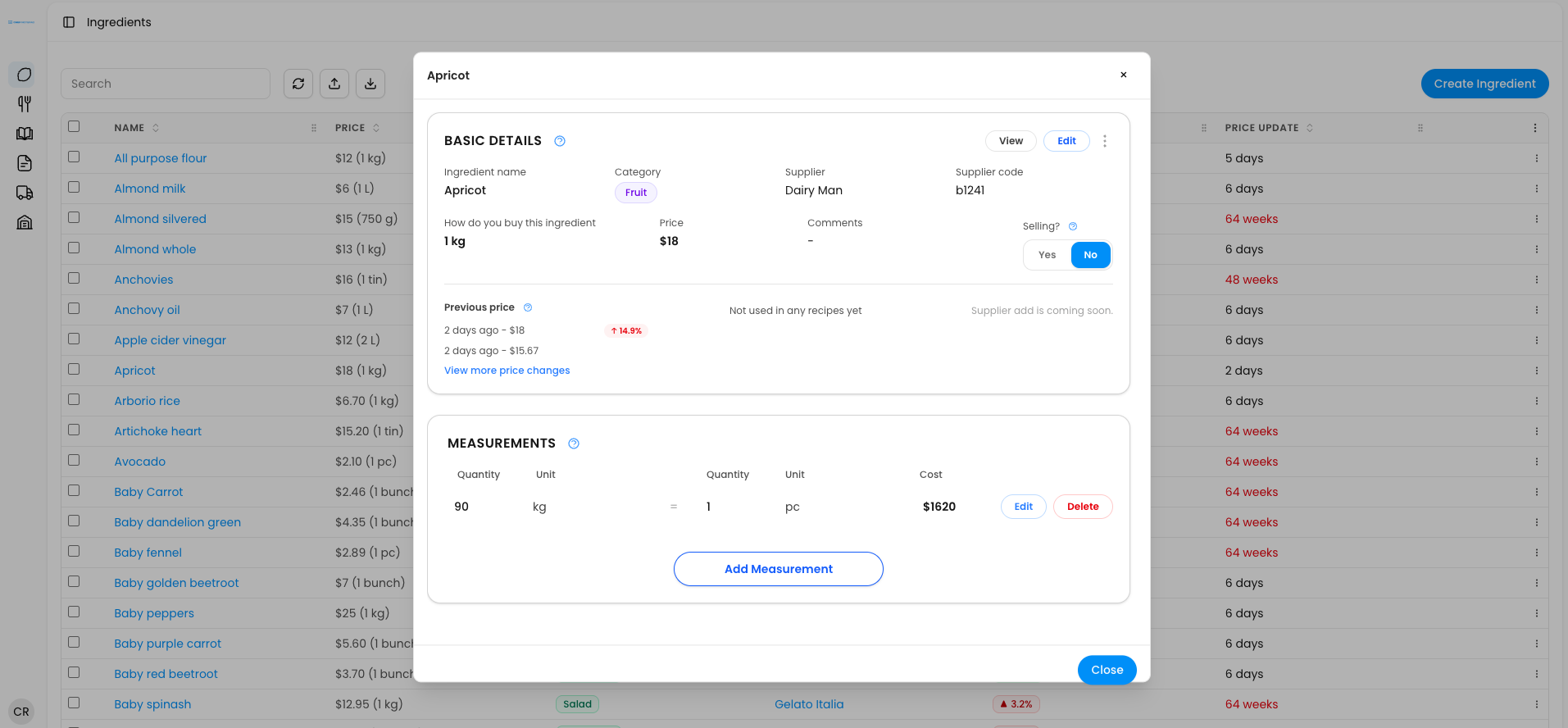
Edits happen in a pop-up. Editing an ingredient no longer opens a new page, it opens in place, so you never lose your spot on the list you were browsing.
Full price history. Click into an ingredient to see every price change over time, not just the current price.
More flexible measurements. Adding a measurement no longer needs to match the exact unit you buy the ingredient in, as long as it links back to one that does. You can also now change the base purchasing measurement itself, something the old version didn't allow, with a warning shown if you do.
Sell ingredients directly. Mark an ingredient as sellable, like a croissant bought by the box, and set a selling price to see its food cost instantly. Add tax, or set a separate price for delivery platforms like Uber Eats or DoorDash, since they add their own charges.
Edit prices from the dashboard. Change an ingredient's price directly from the main list, no need to open the ingredient itself.
Custom category colours. Set a category's colour directly while editing an ingredient, for a cleaner, easier-to-scan dashboard.
Price freshness at a glance. Prices are colour-coded by how recently they were updated, green for current, orange after a week or two, red when it's overdue, a clear signal to check in with your supplier.
Import and update pricing

Bulk import prices in seconds, no more manual updates.
Bringing prices in from a spreadsheet is faster and far more flexible in V2.
Two file formats now work. Import either the standard Chef Notepad template, the same format your ingredient list exports in, or a report generated directly from your invoicing partner, Lightyear.
Smarter column recognition. Columns no longer need to be in a set order, the system reads the column headers themselves, and it's more forgiving with how measurements or dollar values are formatted.
Matches by code first, then name. Chef Notepad matches ingredients by product code where possible, falling back to product name and description if there's no code match, so prices update against the right ingredient either way.
Lightyear import creates new ingredients too. Import a Lightyear invoice report as-is and Chef Notepad updates prices for ingredients you already have, and creates new ones for anything you've ordered that isn't in the system yet, something the old version couldn't do at all.
A lighter option for price-only updates. If you don't want new ingredients created, use Update Prices instead, it reads only the product code and price, excluding GST, and updates matching ingredients without adding anything new.
Bigger dashboard, live sharing links, and total control while editing

Recipes
Recipe dashboard changes:
Split into three clear views. Recipes are now separated into Recipes, your actual sellable dishes, Sub-recipes, batch recipes flagged for reuse in other recipes, and Ingredients, sellable ingredients that carry their own food cost, with an option to see everything together.
See price changes as they happen. Whenever an ingredient or recipe price changes, it shows on the dashboard, for example, cost last changed six days ago, with the direction and percentage of the shift, red and up for an increase, green and down for a decrease.
Edit prices from the dashboard. Change a recipe's selling price directly from the list, no need to open it first.
Created and last-edited dates. See at a glance when a recipe was built and when it was last updated.
Colour-coded food cost. Set a food cost target in settings, recipes on target show green, over target show red, so underperforming dishes stand out immediately.
Viewing a recipe:
Opens as a pop-up. Viewing a recipe no longer opens a new page, keeping your place on the list you were browsing.
More visible detail. Tags, comments, and any sub-recipes, including their method, now show directly in the recipe view.
Flexible printing. Choose exactly what to include, photo, ingredients, method, costing, and scale the recipe before printing.
Shareable links with expiry control. Share a recipe with optional costing and KPI metrics included, and set the link to expire in a day, a week, a month, a year, or never, revoke it anytime, even one set to never expire, for full control over who can still see it.
Editing a recipe:
Add straight to a Recipe Book. File a recipe into a recipe book as you build it.
Coloured, editable tags. Tags now support colour, and units on the recipe can be changed after the fact.
Add your own measurements. Set alternate measurements for a recipe, like a batch that makes 4.2 kilos also being expressed as 120 grams per serve, so it can be used flexibly in other recipes.
Sell recipes directly. Add tax or platform charges like Uber Eats, DoorDash, or Deliveroo, the same as with sellable ingredients.
Drag-and-drop ingredients and steps. Reorder ingredients freely, and break a recipe into named steps, like dough, filling, and finishing, for a clearer method.
Comments on ingredients. Add a note alongside an ingredient, like "warm" or "clarified," not just wastage as before.
Deleted ingredients are recoverable. If an ingredient used in a recipe gets deleted, you can restore it or swap in a replacement, without having to rebuild affected recipes manually.
Recipe book (New)

Bundle recipes into a shareable, printable book for your whole team.
A brand-new feature built for consistency and clear communication across the kitchen.
Group recipes into one book. Create a recipe book and add recipes to it, organised into your own sections, like starters, mains, sides, and desserts, for example, a full book for a specific venue like the Lion's Pub.
Same sharing and printing power as recipes. Share a link with the same expiry controls, one day, one week, one month, one year, or never, and revoke access anytime. Print the whole thing as one polished document, rather than printing each recipe separately.
Set menus and à la carte, now with full food cost and profit tracking.

Menu
Menu dashboard changes:
Choose your menu type. Build a set menu for catering, group bookings, and special events, or a new à la carte menu listing dishes from your regular menu.
Colour-coded performance. Based on your food cost target, menus show green when performing well, red when not, so you can spot problem areas instantly.
See price changes as they happen. Whenever an ingredient or recipe price changes, it shows on the dashboard, for example, cost last changed six days ago, with the direction and percentage of the shift, red and up for an increase, green and down for a decrease.
A la carte menus (New):
Opens as a pop-up. Viewing a recipe no longer opens a new page, keeping your place on the list you were browsing.
More visible detail. Tags, comments, and any sub-recipes, including their method, now show directly in the recipe view.
Flexible printing. Choose exactly what to include, photo, ingredients, method, costing, and scale the recipe before printing.
Shareable links with expiry control. Share a recipe with optional costing and KPI metrics included, and set the link to expire in a day, a week, a month, a year, or never, revoke it anytime, even one set to never expire, for full control over who can still see it.
Set menus:
Section breakdowns and dragging. Add sections like starters, mains, and desserts, and drag dishes to reorder.
Cost per person, visible upfront. See your overall menu cost, food cost, profit, and cost per person at a glance.
Test serving scenarios. Adjust servings on individual dishes to see the effect on food cost, without changing the actual recipe.
Stocktake

Organise by section, export blank, and count straight from your phone.
A brand-new feature built for consistency and clear communication across the kitchen.
Group recipes into one book. Create a recipe book and add recipes to it, organised into your own sections, like starters, mains, sides, and desserts, for example, a full book for a specific venue like the Lion's Pub.
Same sharing and printing power as recipes. Share a link with the same expiry controls, one day, one week, one month, one year, or never, and revoke access anytime. Print the whole thing as one polished document, rather than printing each recipe separately.Built to fit how kitchens actually organise their spaces, and to make counting far less painful.
Organise by category. Create your own categories, cool room, bar, whole kitchen, kitchen west edge, whatever suits your setup.
Created and last-edited dates. Same as recipes, see at a glance when a stocktake was built and last updated.
Export and import with or without counts. Export a stocktake as a blank spreadsheet, add your counts on paper or in the kitchen, then import it back in to fill everything automatically.
Duplicate blank or with existing counts. Previously duplicating meant overwriting every item's count manually. Now you can duplicate a stocktake completely blank and fill in fresh counts straight from your phone or iPad in the kitchen.
Drag, comment, and section it your way. Reorder items, add comments, and break one stocktake into sections, for example, splitting a kitchen stocktake into meat fridge, seafood fridge, and pastry fridge, or a cool room into vegetables, dairy, meat, and seafood, keeping everything organised exactly how your kitchen works.
Settings

Manage your team with roles, from viewers to super admins.
Reorganised into clear sections, with team management as the standout new addition.
Profile and account. Manage your user profile as before, plus new options to choose how units display, kilograms or millilitres, for example, set your food cost targets, and set your own Uber Eats, DoorDash, and Deliveroo commission percentages.
Billing and password. Manage your subscription and password, unchanged from before.
Deleted items. Restore anything you've deleted, all in one place.
Team members and roles. Invite team members with their own login, and assign them a role, viewer, accountant, chef, admin, or super admin, each with its own level of access. Perfect for a kitchen with chefs, sous chefs, and an accountant managing prices, while an owner keeps oversight, and even a viewer can still open a recipe and scale it on the floor.
Trusted by thousands of chefs in over 30 countries.